DoS/DDoS Attacks Across the OSI Model — And How to Fight Back
A deep dive into Denial of Service attack techniques at each OSI layer, with a hands-on TCP SYN Flood demo and a real iptables u32 defense rule.
What is DoS and DDoS?
A Denial of Service (DoS) attack aims to make a server or network resource unavailable to legitimate users. The attacker floods the target with requests or sends malformed packets that cause the system to crash or become unresponsive.
Think of it this way: when you visit a website, your browser sends a request to a server. That server can only handle a limited number of requests at once. If an attacker sends thousands of requests simultaneously, your legitimate request never gets processed — that's a denial of service.
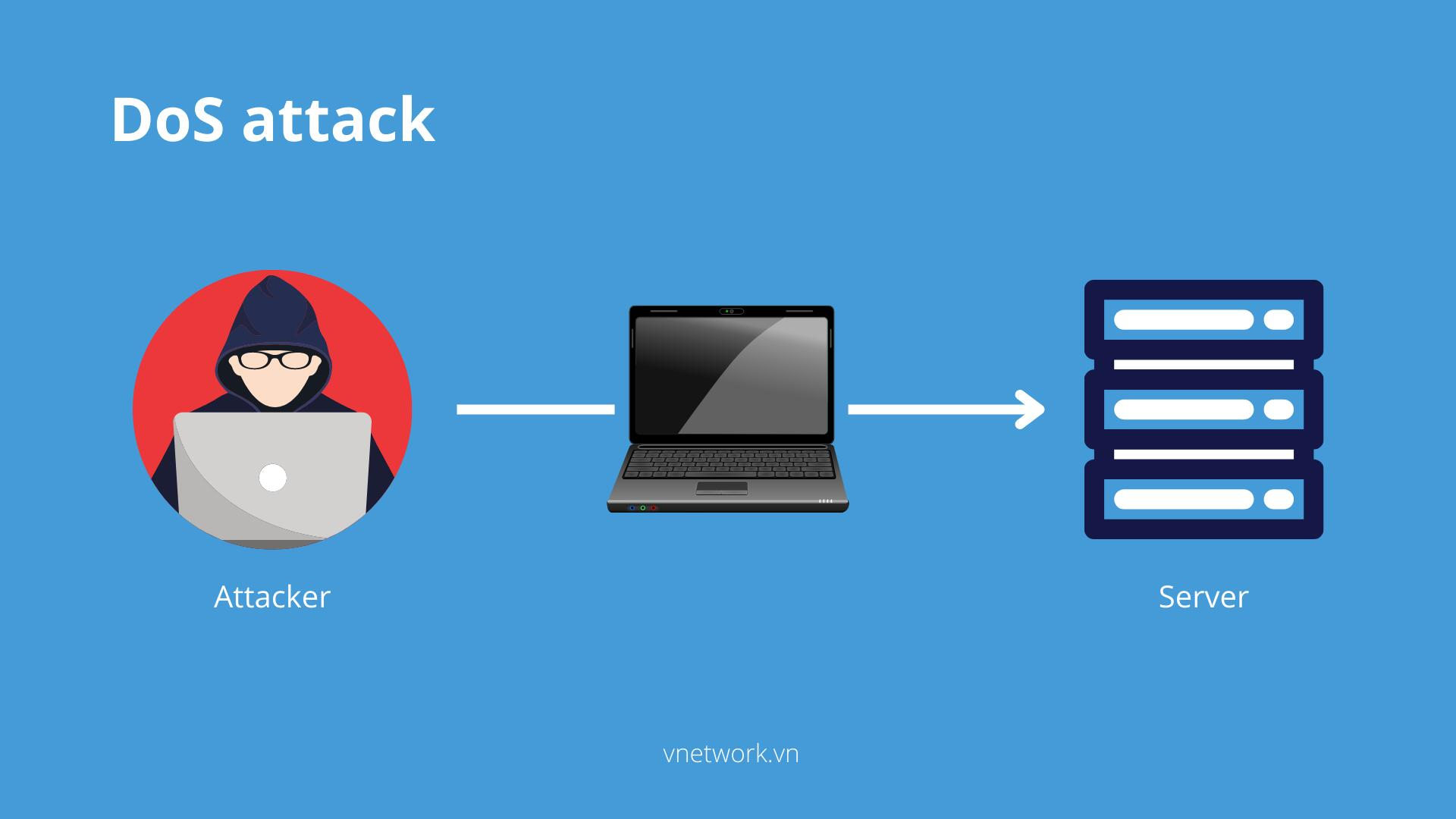
Distributed Denial of Service (DDoS) is the same concept but executed from many sources simultaneously — often using a botnet of compromised machines. This makes it far harder to block since traffic comes from thousands of different IPs.
Common targets include web servers of banks, e-commerce platforms, media companies, and social networks.
Attack Techniques by OSI Layer
The OSI model gives us a useful framework for categorizing DDoS attack types. Here's a breakdown from Layer 7 down to Layer 2.
Layer 7 — Application
This is the most common layer for DDoS attacks because it's the hardest to distinguish from legitimate traffic.
Slowloris
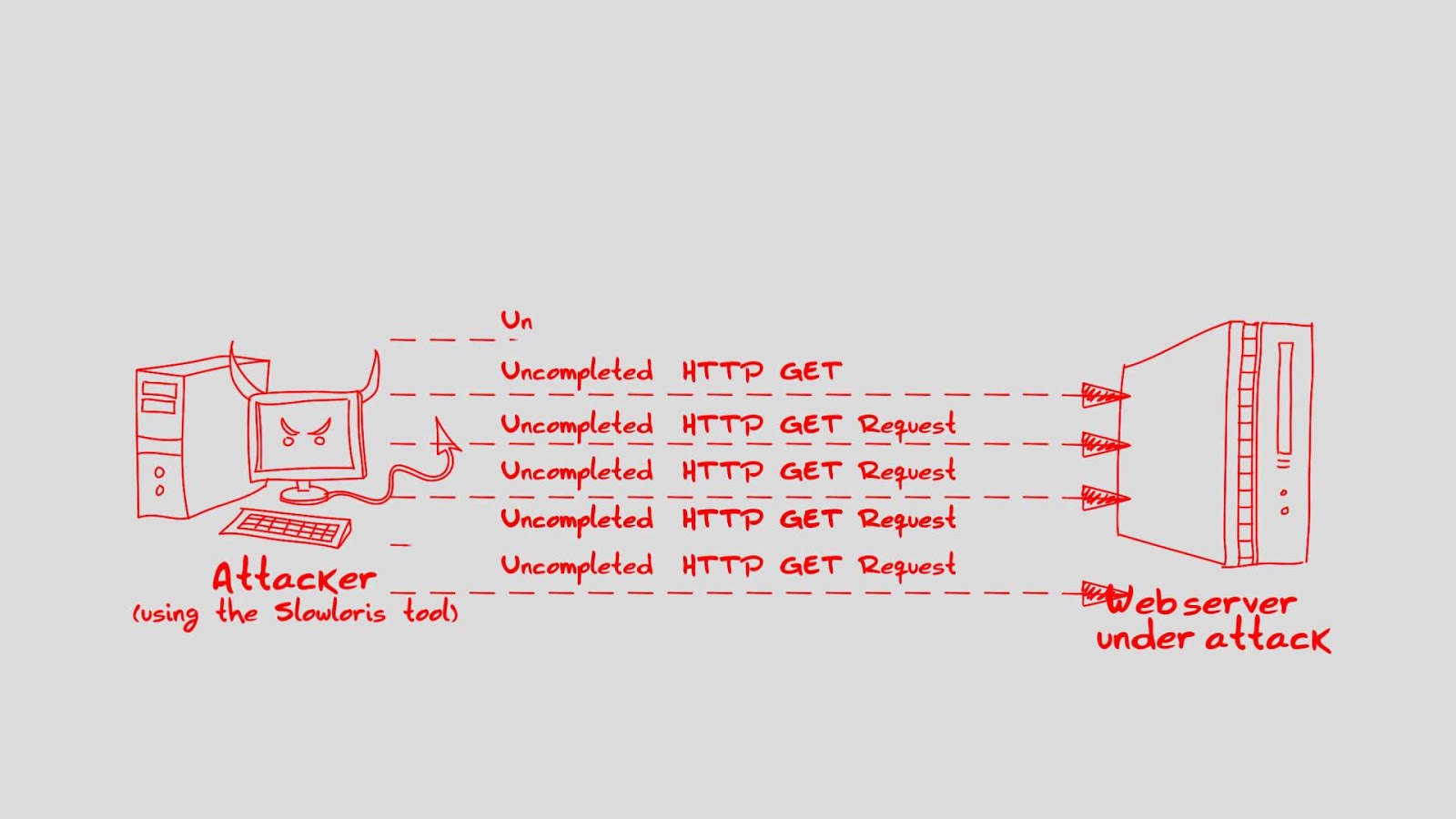
Slowloris opens many partial HTTP connections to a server and keeps them alive by trickling headers slowly, never completing the request. Each connection consumes a server slot. With hundreds of these, the server runs out of available connections while the attacker uses almost no bandwidth.
Reflection Attack
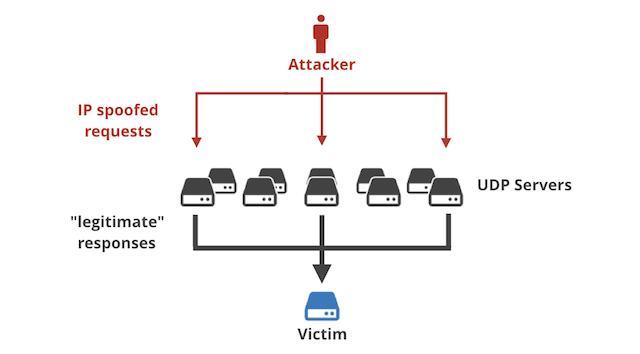
The attacker sends packets with a spoofed source IP (the victim's IP) to many servers. Those servers reply to the victim — not the attacker — flooding it with unsolicited responses.
Slow POST
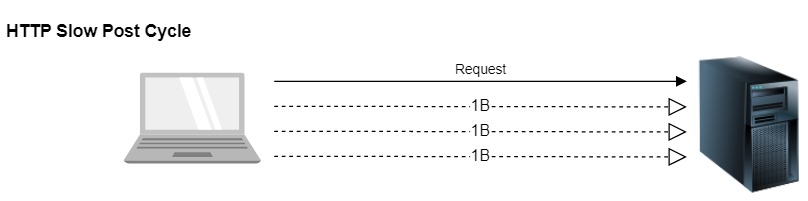
A valid HTTP POST header is sent specifying a large body size, but the body is transmitted at an extremely slow rate — sometimes one byte every two minutes. The server holds the connection open waiting for the rest of the data.
Slow Read
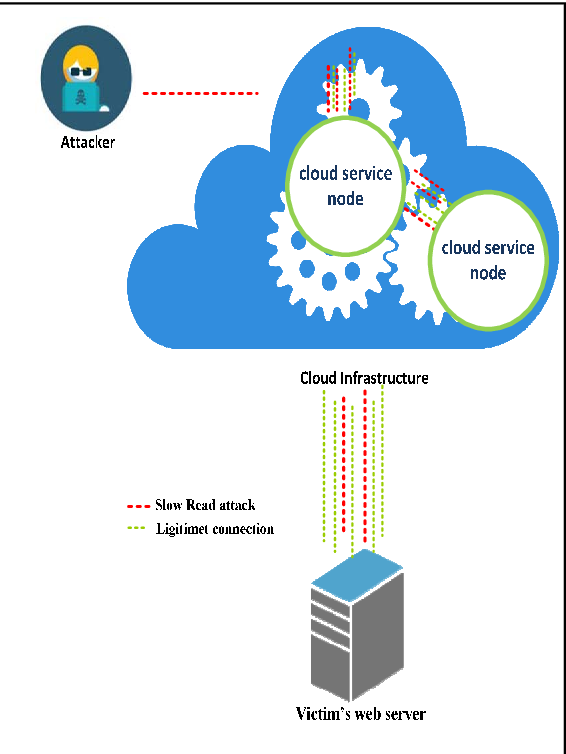
Similar to Slow POST but in reverse. The attacker sends a valid request then reads the response painfully slowly, preventing the server from closing the idle connection.
Mimicked User (Botnet Browsing)
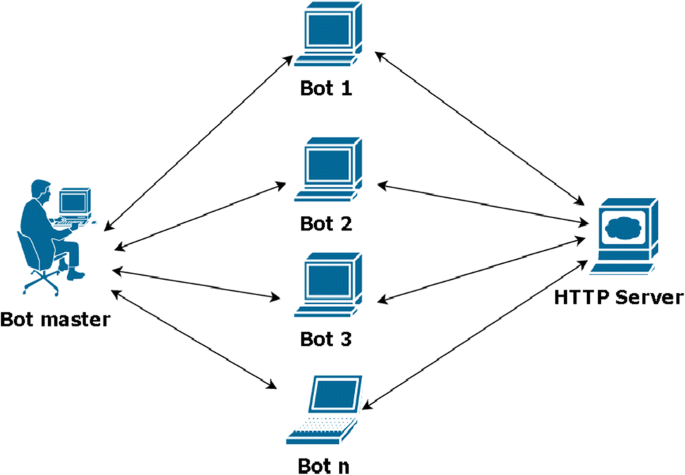
Botnets simulate real user browser behavior — loading pages, clicking links. At sufficient scale this overwhelms the server while bypassing simple bot-detection rules.
Layer 6 — Presentation
SSL Exhaustion
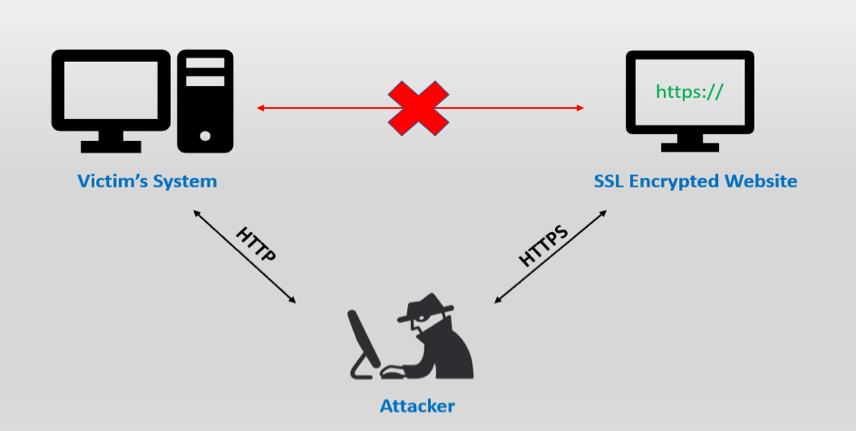
SSL/TLS handshakes are computationally expensive — far more so for the server than the client. Attackers initiate thousands of SSL handshakes without completing them, exhausting server CPU. As more services require HTTPS, this attack surface grows.
Layer 5 — Session
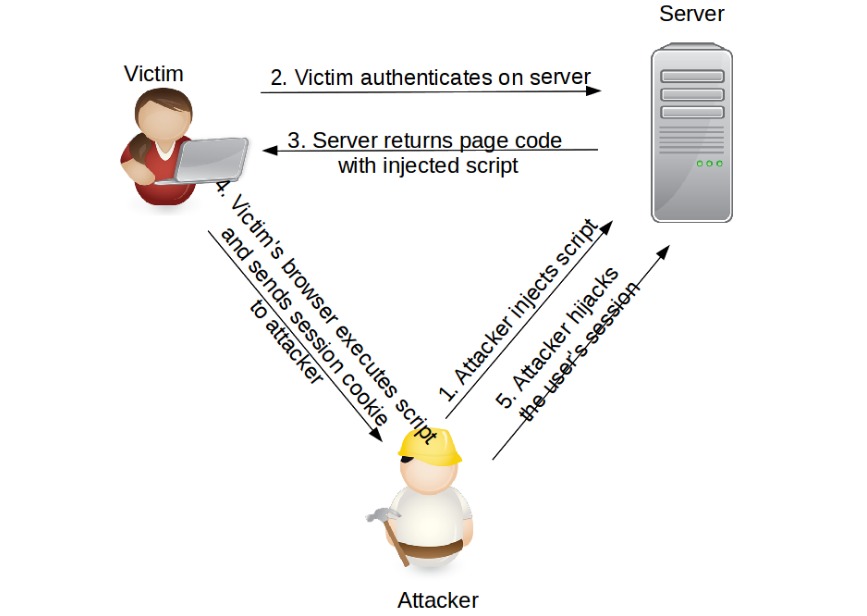
Session hijacking involves stealing or predicting a valid session token to take over an authenticated session. While not always a pure DoS attack, it can be used to disrupt availability by invalidating sessions for legitimate users at scale.
ISO 7498-2 explicitly states no security services are provided at the session layer — defenses must be applied at layers above or below it. Encryption is the most common mitigation.
Layer 4 — Transport
SYN Flood
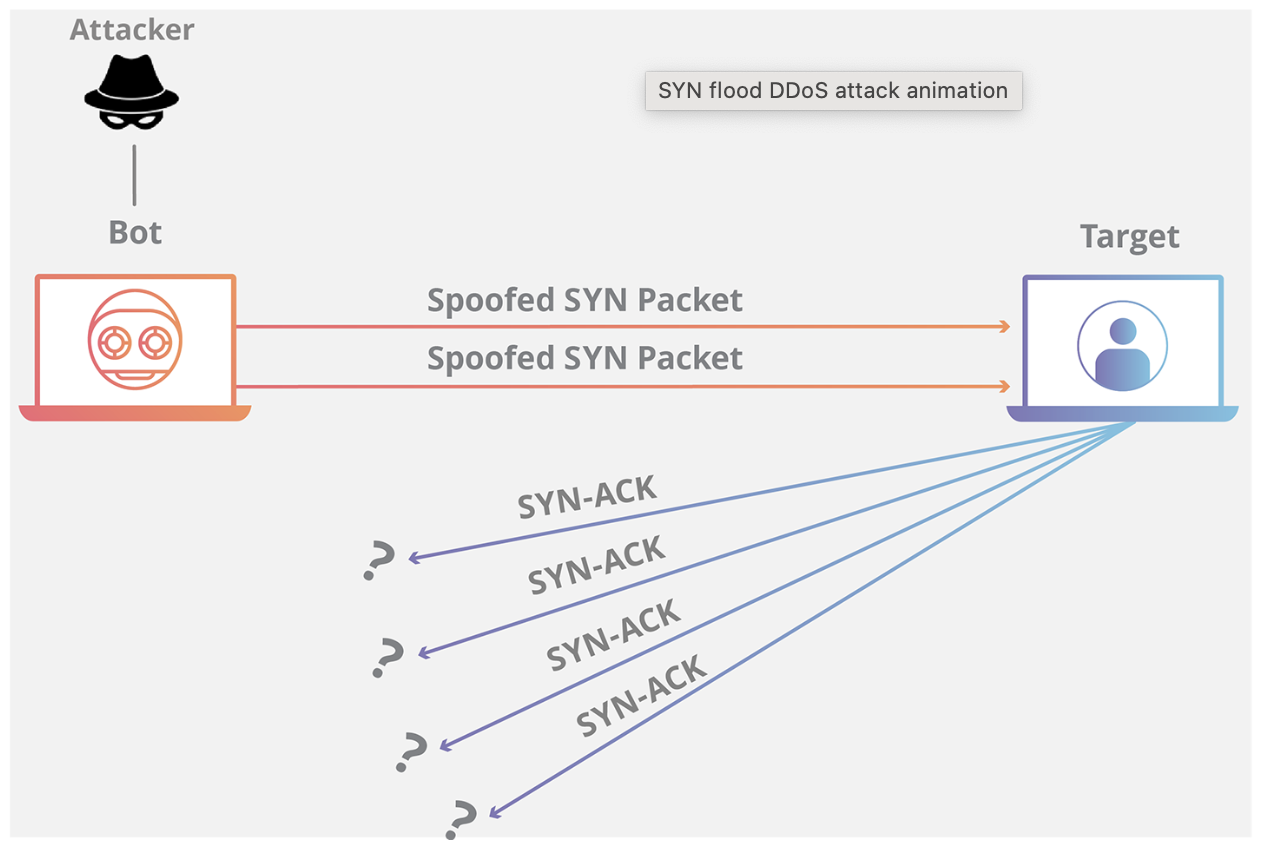
The TCP three-way handshake works like this: client sends SYN → server replies SYN/ACK → client replies ACK. In a SYN Flood, the attacker sends a massive number of SYN packets with spoofed source IPs. The server sends SYN/ACK replies and waits for ACKs that never come, holding each half-open connection in memory using a TCB (Transmission Control Block) — 280 to 1,300 bytes each. When all available TCBs are exhausted, the server can no longer accept new connections.
UDP Flood
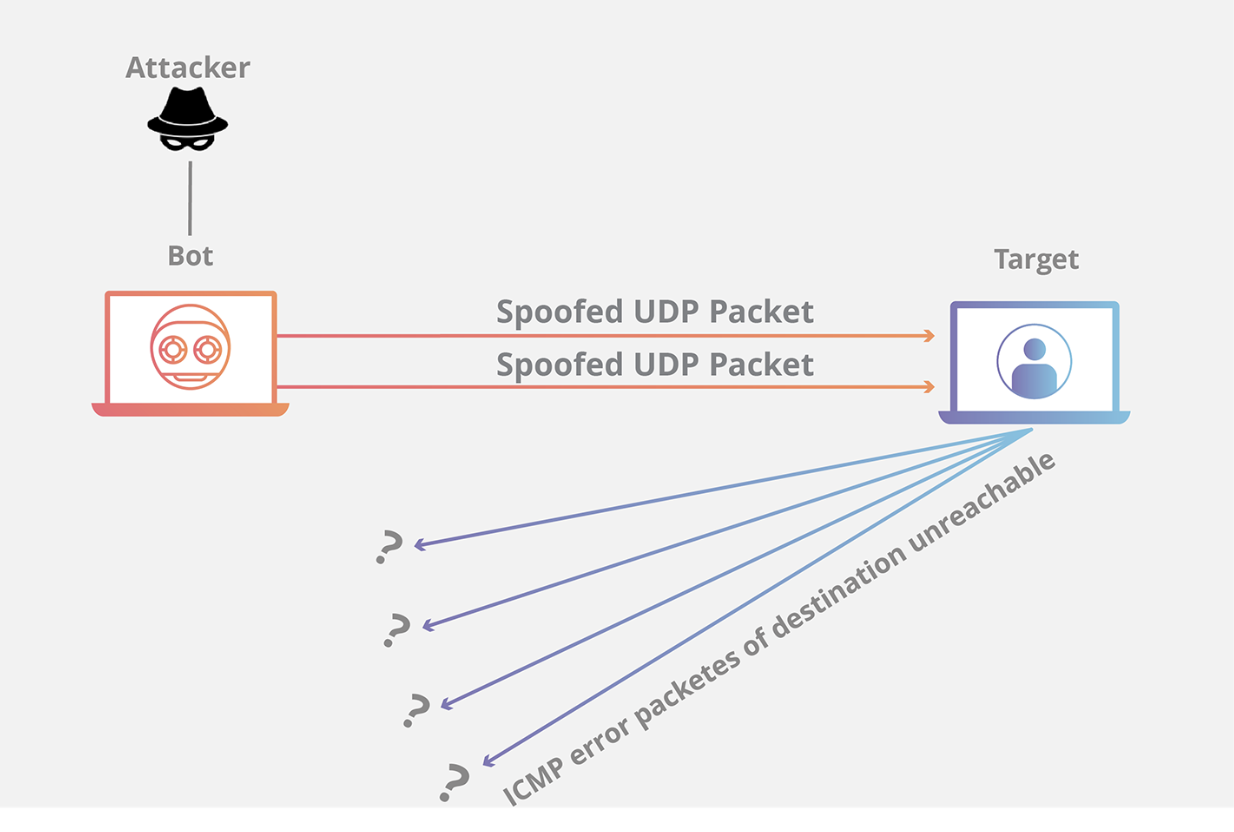
UDP is connectionless — no handshake required. The attacker floods the target with UDP packets. The server must process each one, check if a service is listening on that port, and send an ICMP "port unreachable" reply if not. This resource consumption quickly saturates both bandwidth and CPU.
Layer 3 — Network
ICMP Flood (Ping Flood)
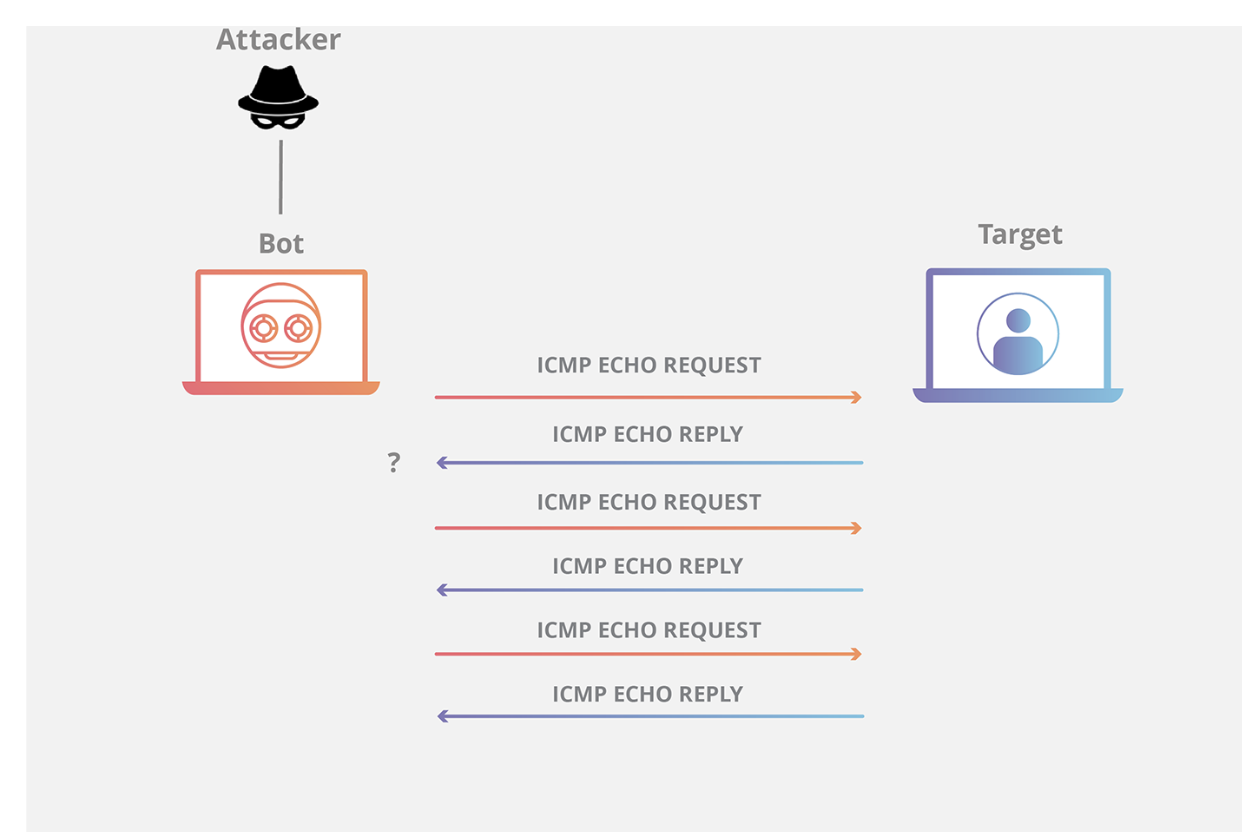
The attacker sends a massive volume of ICMP echo requests (pings) simultaneously, overwhelming the target's ability to respond.
Smurf Attack
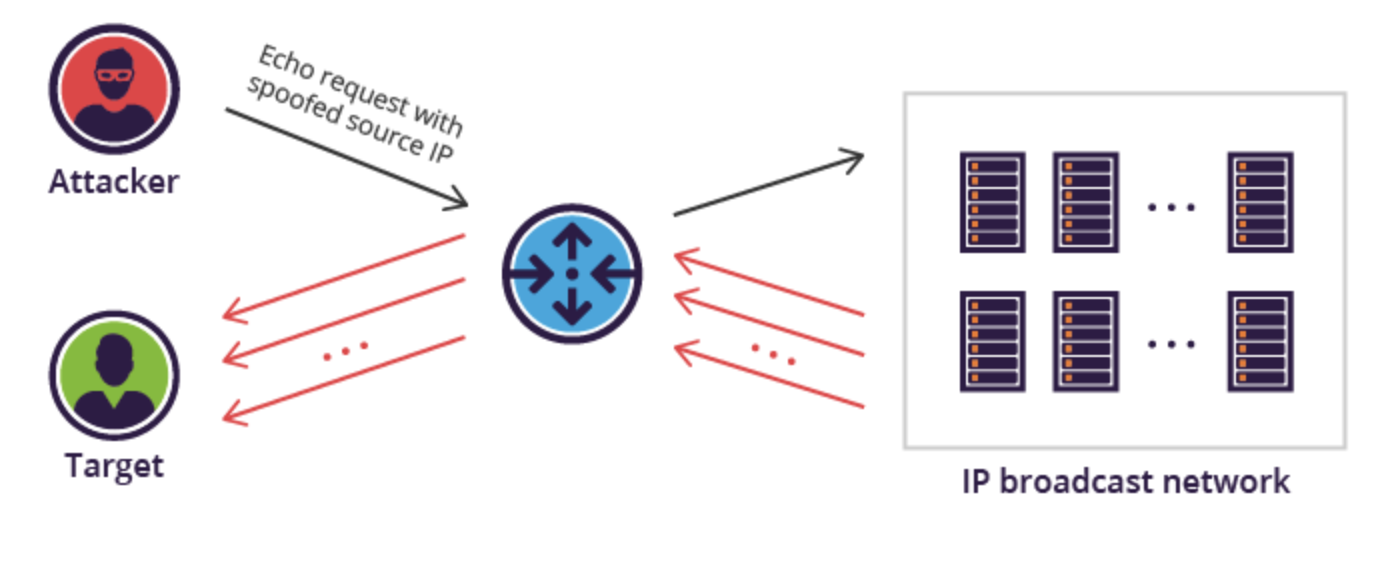
The attacker sends ICMP ping requests to a network broadcast address with the victim's IP spoofed as the source. Every host on that network replies to the victim, multiplying the attack traffic by the number of hosts.
Ping of Death (ICMP Fragmentation)
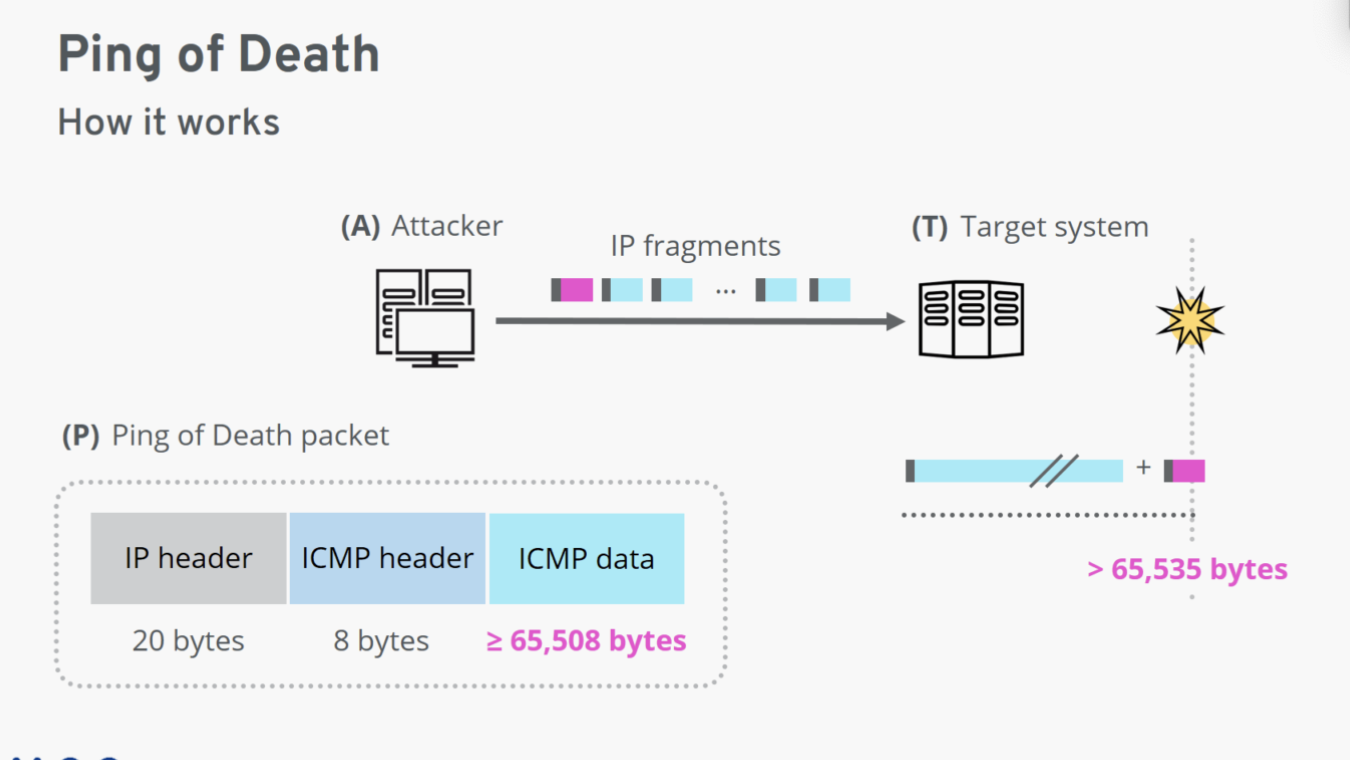
An oversized ping packet (larger than the 65,535 byte IP limit) is sent to the target. Routers fragment it for transit. When the target attempts to reassemble the fragments, the resulting packet exceeds the maximum allowed size — crashing or freezing the system.
Layer 2 — Data Link
MAC Spoofing
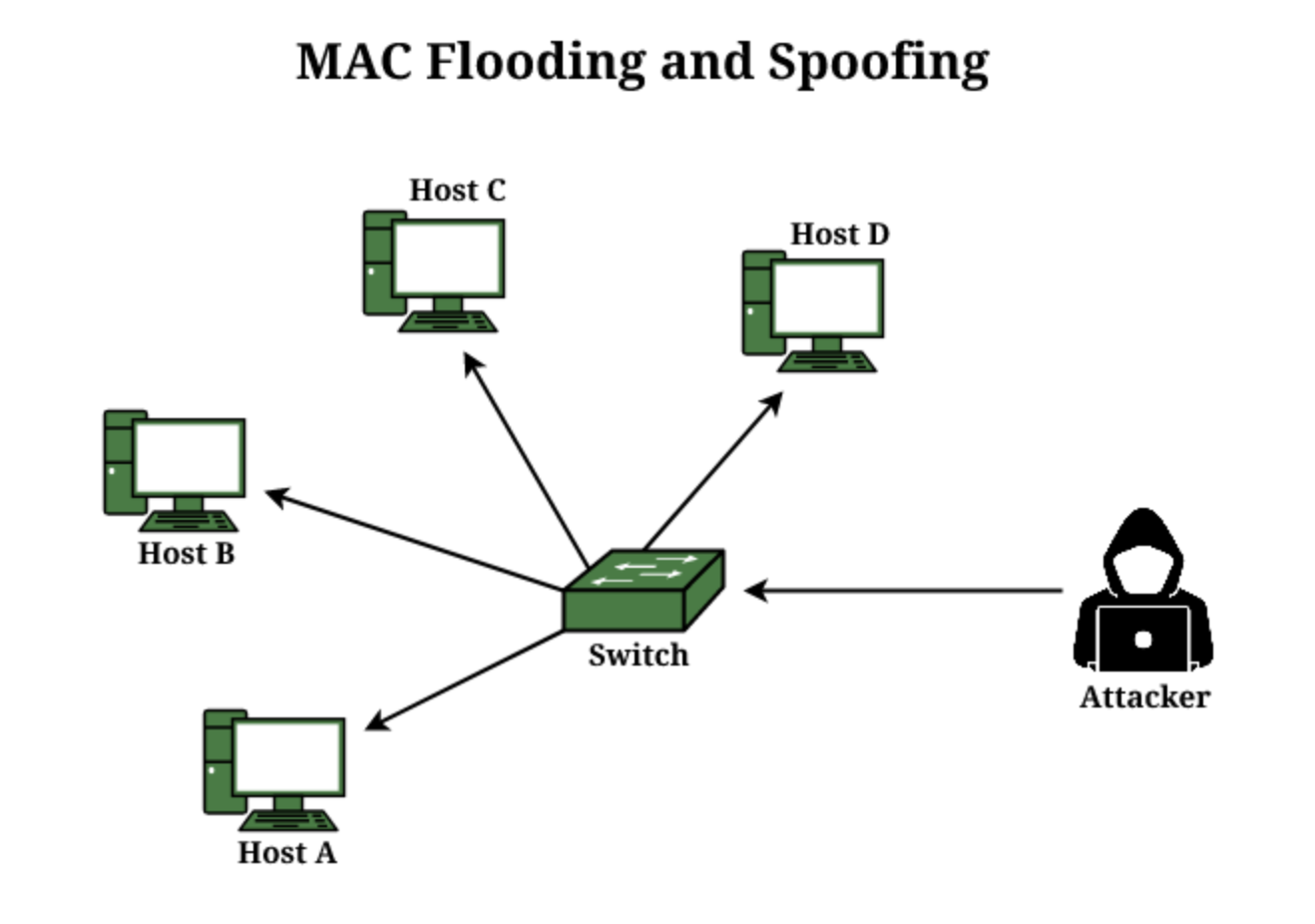
An attacker impersonates another device's MAC address to redirect its traffic. This can be used to intercept traffic or perform a denial-of-service on the impersonated device. Modern switches mitigate this with MAC address limiting per port and AAA server authentication.
Layer 1 — Physical
No documented DoS/DDoS attack techniques target the physical layer in a practical sense.
Hands-On: Simulating a TCP SYN Flood
For a university project, we simulated a TCP SYN Flood attack and built an iptables defense rule to block it. The attack machine ran Kali Linux and the victim ran Ubuntu.
The Attack — hping3
hping3 is a network tool that lets you craft and send arbitrary TCP/IP packets. Install it with:
sudo apt install hping3The attack command:
sudo hping3 --flood --rand-source -S -p 80 --data 4 192.168.204.132| Flag | Meaning |
|---|---|
--flood | Send packets as fast as possible |
--rand-source | Randomize the source IP address |
-S | Set the SYN flag |
-p 80 | Target port 80 |
--data 4 | Attach a 4-byte payload |

Analyzing the Traffic
On the victim, we used vnstat and tcpdump to inspect incoming traffic:
# Monitor network statistics
vnstat

# Capture 100 packets and display them
tcpdump -c 100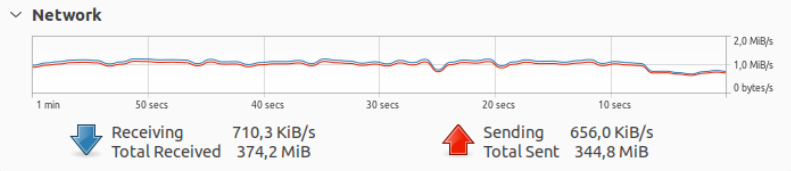


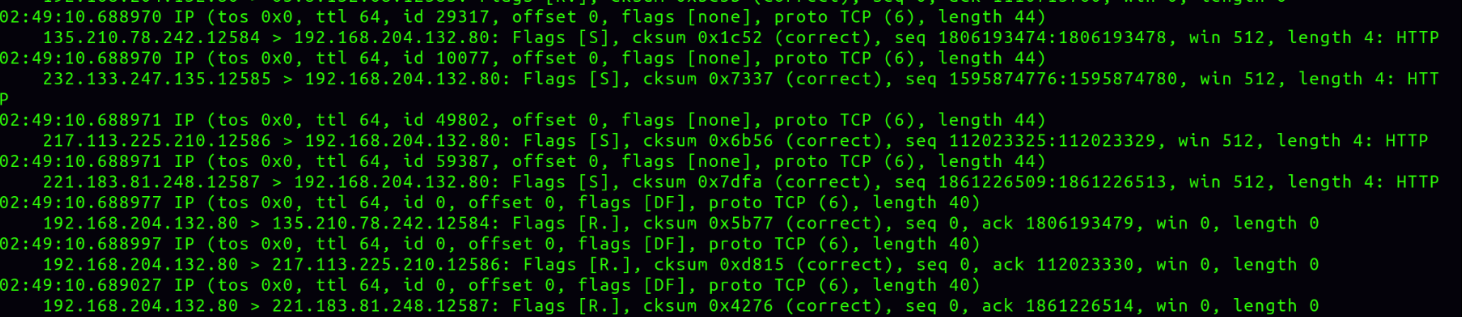
Every captured packet shared the same fingerprint: TCP protocol, SYN flag set, payload present.
Identifying the Attack Source Pattern
We then analyzed source IPs from 1,000 packets:
tcpdump -c 1000 | awk '{print $3}' | sort | uniq -c | sort -rn
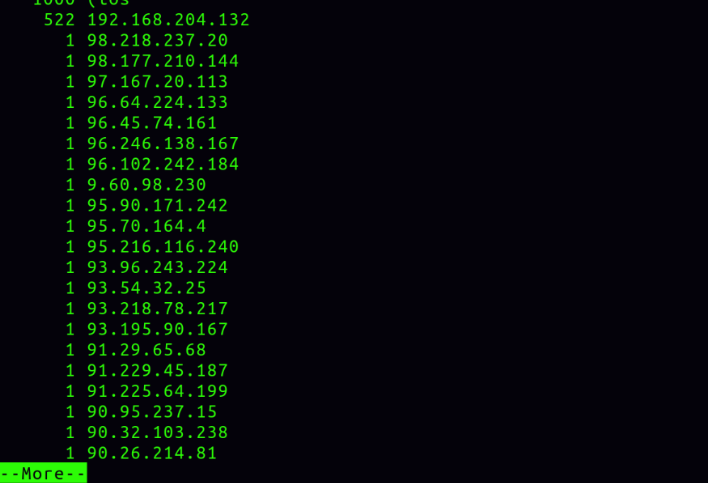
The pattern was clear:
- Source IPs had sequential prefixes
- Each IP appeared exactly once
- Packet structure was identical across all packets
This confirmed it was a fake random IP tool (--rand-source), not a real botnet. A real botnet would show diverse, non-sequential IPs each sending multiple packets.
Summary of the malicious packet fingerprint:
- Protocol: TCP
- SYN flag: set
- Payload: present (> 0 bytes)
Defense: iptables u32 Module
The u32 module in iptables lets you extract and compare raw bytes at any position in a packet. It's powerful for crafting precise match rules against specific packet structures.
Syntax: Start & Mask = Value
- Grab 4 bytes from offset
Start, AND withMask, compare result toValue - If the result is outside the packet boundary, the match returns false by default
Rule 1 — Match TCP Protocol
Check byte 9 of the IPv4 header (the Protocol field). TCP = 6.
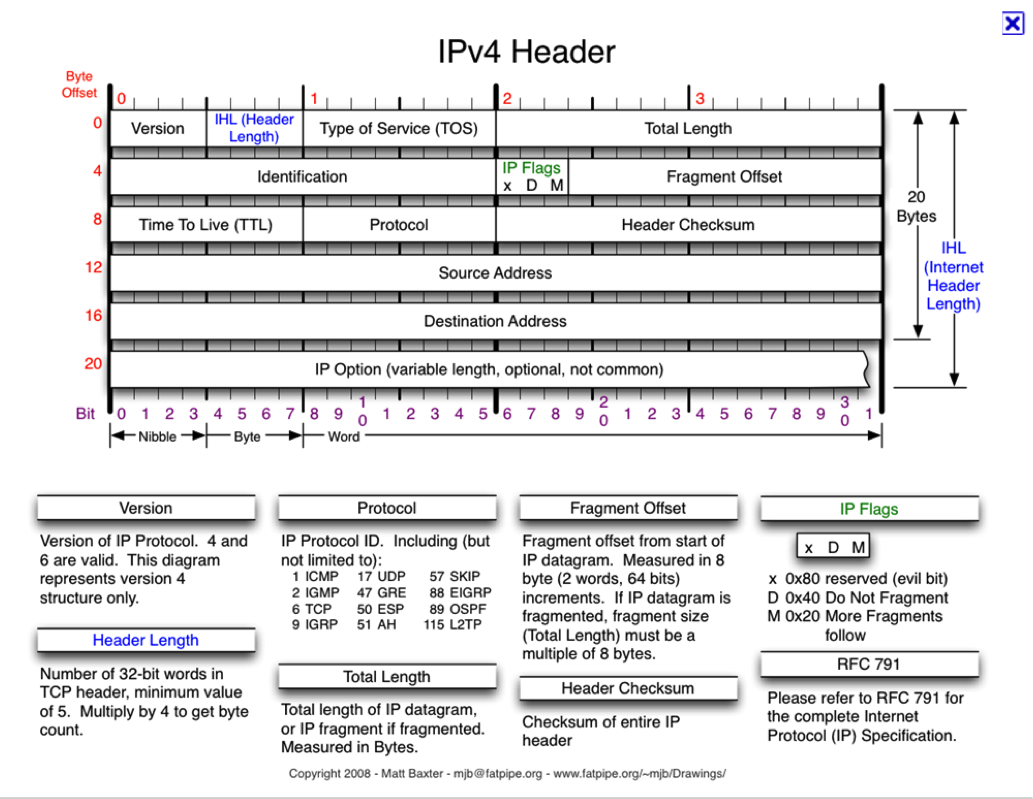
u32: 6 & 0xFF = 6
- Start:
9 - 3 = 6 - Mask:
0xFF - Value:
6
Rule 2 — Match SYN Flag
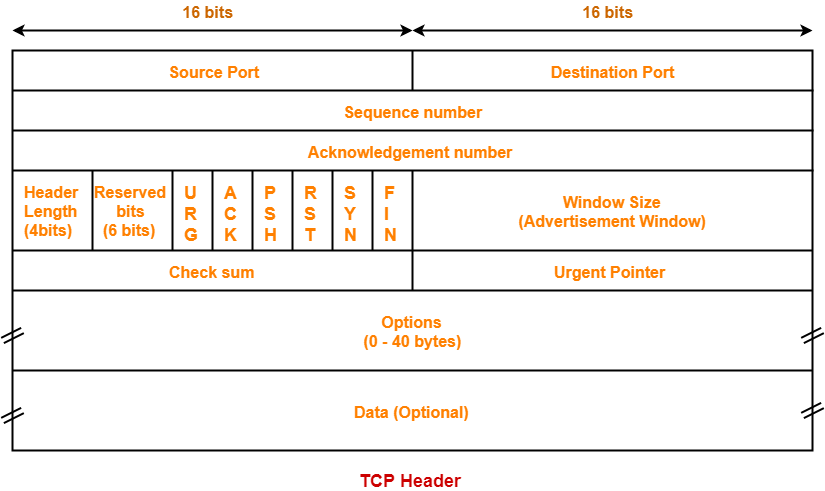

0>>22&0x3C@ 10>>1&0x1 = 0x1
0>>22&0x3C@— calculates the IP header length and jumps to the start of the TCP header10>>1&0x1 = 0x1— grabs bytes 10–13 of the TCP header, shifts right 1 bit to move the SYN bit to the rightmost position, masks off the other 31 bits, checks if it equals 1
Rule 3 — Match Presence of Payload

0>>22&0x3C@ 12>>26&0x3C@ 0>>24 = 0:255
0>>22&0x3C@— jump to TCP header start (skip IP header)12>>26&0x3C@— jump to data start (skip TCP header)0>>24 = 0:255— read the first byte of data; if it exists (0–255), payload is present
Combined Rule — DROP Malicious Packets

sudo iptables -A INPUT -m u32 \
  --u32 "6&0xFF=6 && 0>>22&0x3C@10>>1&0x1=0x1 && 0>>22&0x3C@12>>26&0x3C@0>>24=0:255" \
  -j DROP
This single rule drops any packet that is TCP + SYN flag set + has a payload — exactly the signature of our attack.
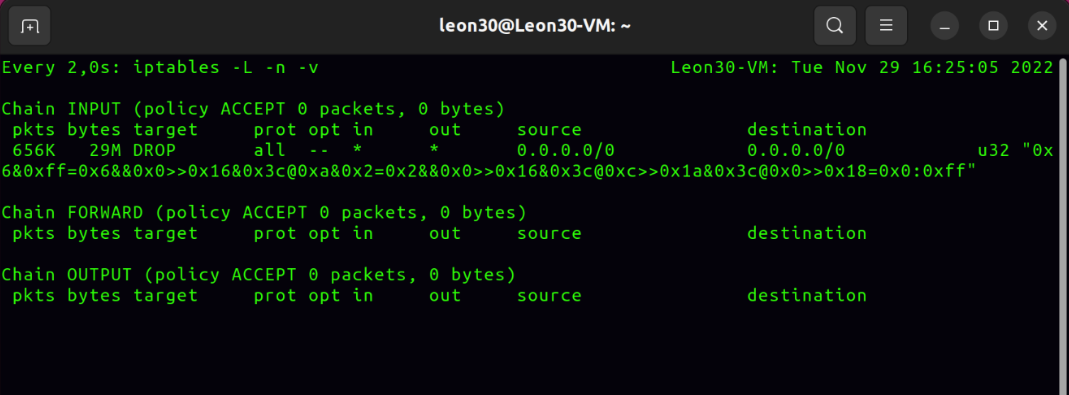
All malicious packets were dropped successfully.
Takeaways
What worked well:
- The attack is simple, resource-efficient, and doesn't require renting a botnet
- The
iptables u32defense is precise — it matched the exact packet fingerprint and dropped 100% of attack traffic
Limitations:
- The
--rand-sourceIP pattern is detectable if you analyze enough packets (sequential prefixes give it away) - The
u32rule has a blind spot: it cannot block SYN packets with a payload smaller than 4 bytes, since the u32 read would fall outside the packet boundary and return false
Real-world note: In production, you'd combine this with rate limiting per source IP, a SYN cookie mechanism (net.ipv4.tcp_syncookies=1), and a proper DDoS scrubbing service (e.g., AWS Shield, Cloudflare) for volumetric attacks that exceed your bandwidth capacity.
Demo video: TCP SYN Flood Attack and Defense